
新版linux用SSH Secure Shell Client登录SSH服务时出现“server responded algorithm negotiation failed”解决方法
亲测可用
前两天在阿里云安装了个centos8.3,装好后用windows的SSH Secure Shell Client登录ssh服务时,提示“server responded algorithm negotiation failed”
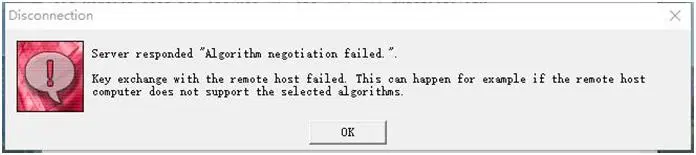
第一时间百度,查到的方法基本上都是在/etc/ssh/sshd_config 文件末尾添加如下代码:
Ciphers aes128-cbc,aes192-cbc,aes256-cbc,aes128-ctr,aes192-ctr,aes256-ctr,3des-cbc,arcfour128,arcfour256,arcfour,blowfish-cbc,cast128-cbc
MACs hmac-md5,hmac-sha1,umac-64@openssh.com,hmac-ripemd160,hmac-sha1-96,hmac-md5-96
KexAlgorithms diffie-hellman-group1-sha1,diffie-hellman-group14-sha1,diffie-hellman-group-exchange-sha1,diffie-hellman-group-exchange-sha256,ecdh-sha2-nistp256,ecdh-sha2-nistp384,ecdh-sha2-nistp521,diffie-hellman-group1-sha1,curve25519-sha256@libssh.org
试了一下,修改配置保存后提示服务无法启动
原因分析:总体原因还是老版本的客户端不支持新加密方法
解决方法:
centos8.3参数不在/etc/ssh/sshd_config修改,改版本的sshd服务是带参数直接启动的,其启动参数放在/etc/crypto-policies/back-ends/opensshserver.config文件里,如下图找到-oKexAlgorithms,在这个参数的最后把diffie-hellman-group1-sha1添加进去、

在重启sshd服务就可以连接了