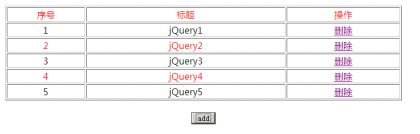
jquery下动态表格的添加删除
<head>
<meta http-equiv=”Content-Type” content=”text/html; charset=utf-8″ />
<script type=”text/javascript” src=”jquery.js”></script>
<style type=”text/css”>
.red
{
color:red
}
</style>
<script>
function hello()
{
$(“#tab tr:even”).addClass(“red”)
}
function deltr(index)
{
$table=$(“#tab tr”);
{
$(“tr[id='"+index+"']“).remove();
for(var temp=index+1;temp<=$table.length;temp++)
{
$(“tr[id='"+temp+"']“).replaceWith(“<tr id=”+(temp-1)+”><td align=’center’>”+(temp-1)+”</td><td align=’center’>jQuery”+(temp-1)+”</td><td align=’center’><a href=’#’ onclick=’deltr(“+(temp-1)+”)’>删除</a></td></tr>”);
}
hello()
}
}
$(document).ready(function(){
$(“#but”).click(function(){
var $table=$(“#tab tr”);
var len=$table.length;
$(“#tab”).append(“<tr id=”+(len)+”><td align=’center’>”+len+”</td><td align=’center’>jQuery”+len+”</td><td align=’center’><a href=’#’ onclick=’deltr(“+(len)+”)’>删除</a></td></tr>”);
hello()
})
})
</script>
</head>
<body>
<br/>
<table id=”tab” border=”1″ width=”60%” align=”center”>
<tr><td width=”20%” align=”center”>序号</td>
<td align=”center”>标题</td>
<td align=”center”>操作</td>
</tr>
</table>
<br/>
<div style=”border:2px; border-color:blue;”>
<div align=”center”><input type=”button” id=”but” value=”add”/></div>
</div>
</body>
</html>
注意红色jquery路径,运行如下,你可以把文字修改成<input type=’text’>的